
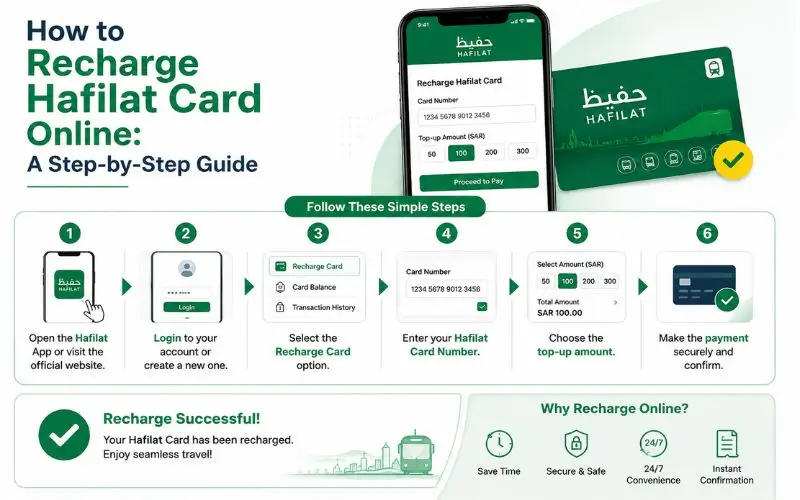
Running out of Hafilat card balance mid-commute is a frustration every Abu Dhabi bus rider knows too well. The validator beeps red, the bus moves on, and you’re left scrambling. The simplest way to prevent this from ever happening is to know how to top up your card quickly and in 2026, doing a hafilat balance check and recharging online takes under two minutes from your phone or computer without stepping outside.
This step-by-step guide covers every online and offline recharge method available in 2026, including the official Darb portal, the Darbi app, the TAMM portal via UAE PASS, the PayIt wallet, and physical options like Ticket Vending Machines and authorized retailers. Whether you are a daily commuter, a student, or a first-time visitor to Abu Dhabi, this guide has every method you need to keep your card loaded and your journeys running smoothly.
Before You Recharge: What You Need to Know
Your Hafilat Card Serial Number
Every recharge method online and offline requires your card serial number. This is the 15 to 16-digit number printed on the back of your physical Hafilat card. Locate it before beginning any recharge process to avoid delays.
If you don’t have your physical card at hand, log in to your Darb account your linked card number will be visible in the “My Cards” section.
Recharge Limits and Rules (2026)
- Minimum top-up amount: AED 10
- Top-up increments: AED 5 (so AED 10, 15, 20, 25, and so on)
- Maximum card balance: AED 150
- Balance validity: 3 months from the recharge date
- Activation after recharge: Tap your card on any bus validator or TVM to activate the recharged balance if it doesn’t reflect automatically
The maximum balance that can be credited to the card is AED 150, with a validity period of 3 months from the recharge date. Activate the balance usage before expiration by using the card for travel or tapping the card on sales and recharge machines.
Recommended Minimum Balance to Maintain
Decide on a minimum balance amount that you will never go below, such as AED 20 or AED 30. When your card reaches that limit, recharge immediately. This prevents transaction rejections at the bus validator during peak travel times.
Online Recharge Method 1: Official Darb Portal:
The Darb portal is the primary official platform for all Hafilat card services. It is the most universally accessible method that works on any device with a browser, no app required.
Step-by-step:
- Open your browser and go to hafilat.darb.ae
- Look for the “Recharge Card” button on the right side of the homepage and click it
- You will be redirected to the card serial number entry page
- Enter your 15 to 16-digit Hafilat card serial number exactly as it appears on the back of your card no spaces, no errors
- Complete any CAPTCHA verification if prompted
- Click “OK” to proceed
Your current balance, card type, expiry date, and transaction history will be displayed. From this same page, continue with the recharge:
- Click “Select Recharge Option” a dropdown menu will appear
- Choose your desired top-up amount from the predefined options: AED 10, 20, 50, 100 (up to AED 150 maximum balance)
- Click “Add to Basket” and then “View Basket” to confirm your selection
- Enter your email address to receive a payment confirmation
- Click “Proceed to Payment”
- Select your preferred payment method:
- Visa or Mastercard credit/debit card
- UAE-issued debit cards
- Apple Pay or Google Pay
- Enter your card details card number, cardholder name, expiry date, and CVV
- Enter the OTP (One-Time Password) sent to your registered mobile number
- Click “Pay” to complete the transaction
Once payment is confirmed, you will receive an SMS confirmation with your new balance. The updated balance typically reflects on the bus validator within 15 to 30 minutes. For immediate activation, tap your Hafilat card on any TVM or bus validator.
Security tip: For security, make sure the page shows a padlock icon in the address bar (HTTPS) before entering any hafilat balance check number.
Online Recharge Method 2: TAMM Portal via UAE PASS
The Darb platform has been integrated into the TAMM Portal Abu Dhabi’s unified government services hub allowing residents with UAE PASS to recharge their Hafilat card through a single verified login.
Step-by-step:
- Go to the TAMM portal (tamm.abudhabi) or access it through the UAE PASS app
- Log in using your UAE PASS credentials
- After login, UAE PASS will show a verification prompt click on the number shown and grant permission
- Search for “Hafilat Card Services” or navigate to the transport section
- Click “Hafilat Add Card Plus”
- Enter your card serial number and cardholder name (nickname and email are optional but recommended)
- Click “Add Card” your card details will appear, showing your current balance, card type, and expiration date
- Click the “Top Up” button below your card details
- Select your desired recharge amount
- Enter your valid debit/credit card details cardholder name, card number, expiry, and CVV
- Click “Pay” and enter the OTP received on your registered mobile number
- Your recharge will be confirmed and balance updated
Why use TAMM? If you already use UAE PASS for other government services in Abu Dhabi, TAMM offers the added convenience of a single verified login across all services with no separate Darb account required.
Online Recharge Method 3: Darbi Mobile App
The Darbi app allows you to recharge your Hafilat card directly from your smartphone. Download the Darbi app from the Google Play Store (Android) or the Apple App Store (iOS – UAE). After installing, register or log in to your account, then go to the “Public Transport” section. Tap the plus (+) icon at the bottom right, select “Recharge Hafilat,” and enter your card serial number.
Full step-by-step:
- Download and install the Darbi app from the Apple App Store or Google Play Store search “Darb Abu Dhabi”
- Open the app and register a new account or log in using UAE PASS or your existing credentials
- Navigate to the “Public Transport” section on the home screen
- Tap the “+” (plus) icon at the bottom right corner
- Select “Recharge Hafilat” from the options
- Enter your Hafilat card serial number or scan it using your phone camera
- Once your card is added to the app, go to “My Cards” and select it
- Tap “Top Up” or the recharge icon
- Choose your recharge amount (minimum AED 10, maximum AED 150, in AED 5 increments)
- Select your payment method credit/debit card, Apple Pay, or Google Pay
- Complete payment and enter your OTP if prompted
- Your balance will update in the app within 2 to 3 minutes
Auto top-up feature: From settings, set up an automatic top-up in the Darb Mobile App or Payit Wallet App, so whenever your Balance finishes, the system automatically adds funds to your Card. This is the most stress-free option for daily commuters who want zero interruption to their travel.
Online Recharge Method 4: PayIt Mobile Wallet
PayIt mobile wallet offers a convenient and user-friendly recharge experience. Access the UAE Bills & Recharge section, open the PayIt app and click on the “UAE Bills & Recharge” tab on the home screen to access the bill payment and recharge section. Select Hafilat as the carrier. From the list of service providers, choose “Hafilat” as the carrier for your smart travel card. Enter the Hafilat Card Serial Number.
Full step-by-step:
- Download the PayIt app from the Google Play Store or Apple App Store
- Register or log in using UAE PASS or your PayIt credentials
- On the PayIt dashboard, tap “UAE Bills & Recharge”
- Select “Public Transport” from the category list
- Choose “Hafilat” as your service provider
- Enter your 16-digit Hafilat card serial number in the designated field
- Create a nickname for your card (e.g., “My Bus Card”) this allows you to skip re-entering details on future top-ups
- Click “Register Details” to save your card
- Select your desired recharge amount (AED 10 to AED 100 via PayIt)
- Complete payment using your PayIt wallet balance or a linked credit/debit card
- Your updated balance will reflect in the app, and you will receive a confirmation SMS
Important note: You cannot recharge Hafilat in the Payit Wallet. Do not confuse Hafilat TVMs with common bill payment kiosks (like NT.Payments or MBME) found in malls. While you can pay Salik or Etisalat bills there, Hafilat card recharge is NOT available on these generic machines. Always use the official green/white TVMs at bus stops or the large white machines at stations.
Recharge Amount Comparison: Pay-Per-Trip vs. Passes
Choosing how much to load on your Hafilat card depends on how often you travel. Here is a practical breakdown to help you decide:
| Traveler Type | Recommended Option | Cost |
| Daily commuter (5+ trips/week) | Monthly unlimited pass | AED 95 |
| Regular traveler (2–4 trips/week) | Pay-per-trip credit | AED 30–50 load |
| Short-term visitor (days) | Weekly pass | AED 35 |
| Senior citizen / Person of Determination | Special card (free travel on city routes) | No credit needed |
| Student | Student card (discounted fares) | Load as needed |
Daily commuters using 5 or more trips per week should use the monthly pass at AED 95 as the best choice. It costs less than regular pay-per-trip usage and removes all balance-monitoring stress. Occasional travelers taking 2 to 4 trips per week should load AED 30 to AED 50 of credit and pay per trip more flexibly and avoid paying for travel they would not fully use.
Offline Recharge Method 1: Ticket Vending Machines (TVMs)
For immediate balance updates without any internet, Ticket Vending Machines at Abu Dhabi bus stations are your fastest physical option.
Step-by-step:
- Locate a TVM at any major Abu Dhabi bus terminal Central Bus Station, Al Wahda, Mussafah, Al Ain, Marina Mall, or Abu Dhabi Airport
- Place or tap your Hafilat card on the card reader as instructed on screen
- Select “Recharge” or “Top Up” from the on-screen menu
- Choose your desired recharge amount
- Pay by cash (banknotes) or card (tap or insert)
- Wait for the on-screen confirmation your balance is updated instantly
- Optionally print a receipt by selecting the print option before removing your card
If you want immediate balance reflections, use the TVM located throughout Abu Dhabi. Tap your card on any bus validator or TVM machine this forces the balance to update instantly.
Note: Banknote Reloader (BR) kiosks cash-only machines in some Abu Dhabi transport locations work similarly to TVMs but accept only cash. No internet, no card required. Simply insert your Hafilat card and deposit the cash amount to recharge instantly.
Offline Recharge Method 2: Authorized Retail Partners
Several major retailers across Abu Dhabi are authorized to recharge Hafilat cards over the counter, convenient if you’re already shopping or need an alternative to the TVM.
Authorized retailer locations include:
- Lulu Hypermarket (all Abu Dhabi, Al Ain, and Al Dhafra branches)
- ADNOC stations
- Abu Dhabi Cooperative Society (SPAR)
- Al Ain Cooperative Society
- Al Dhafra Co-op Society Supermarkets
- Lulu Exchange branches
How to recharge at a retailer:
- Approach the customer service counter or designated Hafilat service point
- Present your Hafilat card (or provide the 16-digit serial number)
- State the amount you want to load
- Pay by cash or card depending on the store’s payment setup
- The staff will process the recharge and provide a receipt
Recharging at a retailer may take up to 24 hours depending on the location, so this is not recommended when you need an immediate balance update. For urgent top-ups, use the Darb portal or a TVM instead.
Offline Recharge Method 3: Customer Happiness Centers
For passengers who prefer face-to-face assistance, Hafilat Customer Happiness Centers at major bus terminals process card recharges directly. Simply visit any Customer Happiness Center at Abu Dhabi Central Bus Station, Al Wahda Bus Station, Mussafah Bus Station, or Al Ain Bus Terminal. Present your Hafilat card and the desired top-up amount, and staff will process the recharge immediately by cash or card.
How Long Does a Hafilat Recharge Take to Reflect?
Knowing the sync timeline helps you plan when to top up relative to your journey:
| Recharge Method | Balance Reflection Time |
| TVM / Bus Validator | Instant |
| Darb Portal (online) | 15–30 minutes (tap card on validator to activate) |
| Darbi App | 2–5 minutes in app; 15–30 minutes on validator |
| TAMM Portal via UAE PASS | 15–30 minutes |
| PayIt App | Within minutes |
| Authorized Retailers | Up to 24 hours |
| Customer Happiness Center | Immediate |
After an online recharge, it may take 15 to 30 minutes for the balance to reflect on the bus card reader. Recharge at least an hour before your journey.
If your balance doesn’t update after an online recharge, tap your Hafilat card on any TVM or bus validator. This physical tap forces an immediate sync between the online transaction and your card’s stored balance.
Troubleshooting Common Recharge Issues
Balance not updated after online payment: Wait 15 to 30 minutes, then tap your card on any TVM or bus validator. This activates the online recharge. After recharging the Hafilat bus card, always check the card balance again because sometimes the card is recharged, but the balance does not show on the card due to a technical issue, so it is useful to check after recharging.
Payment declined online: Confirm your card supports international or online transactions some UAE-issued debit cards require activation for online payments. Try an alternative payment method such as Apple Pay or Google Pay if available.
“Invalid card number” error on the portal: Double-check that you are entering the serial number without spaces. Some portals display the card number with spaces for readability, but the entry field requires the number as one continuous string.
Smart Recharge Habits for Abu Dhabi Commuters
Install both apps: Keep Darb and Payit for backup. Use SMS Backup: Text BAL followed by your card number to 3009 for balance checks offline. Bookmark the website: Save haflatbalanccheck.ae for easy desktop access. Buy Passes: Use weekly (AED 35) or monthly (AED 80) unlimited passes for regular travel. Keep receipts: Helps with record-keeping and reimbursements.Keep receipts: Helps with record-keeping and reimbursements, especially when comparing different types of Hafilat cards for personal or work travel needs.
Recharge early, never last-minute. Plan ahead: recharge early during holidays or busy seasons. During peak demand periods like Eid, National Day, and school enrollment season, online systems may slow down and TVM queues may lengthen.
Link your payment card to the Darb app once. Add your debit or credit card to the Darb App or Hafilat Online Portal. Once linked, you can recharge in just one tap no need to re-enter your details every time.
Combine your Hafilat top-up with your grocery run. Next time you’re at Lulu, SPAR, or Co-op, recharge your Hafilat card right there. It’s a quick advantage to your shopping trip and saves you from making a separate journey just to top up.
Enable automatic top-up. Setting up auto top-up in the Darb or PayIt app ensures your card is always funded; the system adds credit automatically when your balance drops below a set threshold. It’s the most reliable way to guarantee uninterrupted travel.
Quick Reference: All Recharge Methods at a Glance
| Method | Internet | App | Instant Balance | Best For |
| Darb Portal (hafilat.darb.ae) | Yes | No | No (15–30 min) | Desktop/browser users |
| TAMM Portal via UAE PASS | Yes | No | No (15–30 min) | UAE PASS account holders |
| Darbi Mobile App | Yes | Yes | In-app: 2–5 min | Daily commuters |
| PayIt Mobile Wallet | Yes | Yes | In-app: fast | FAB / PayIt users |
| TVM at Bus Station | No | No | Yes (instant) | Urgent same-day top-up |
| Authorized Retailers (Lulu, SPAR) | No | No | No (up to 24 hrs) | Combined with shopping |
| Customer Happiness Center | No | No | Yes (instant) | Assisted in-person top-up |
Final Thoughts
Recharging your Hafilat card in 2026 is one of the easiest things you can do as an Abu Dhabi public transport user. With multiple online portals, dedicated apps, retail partners, and self-service machines spread across the emirate, there is never a situation where you are genuinely stuck without a way to top up. For maximum convenience, choose the Darb portal or Darbi app for online recharges and keep the TVM as your backup for immediate, same-day balance updates. Set up auto top-up if you commute daily, and always check your balance before a journey rather than at the bus stop. A well-managed Hafilat card means one less thing to worry about in your daily commute and in a city that moves as fast as Abu Dhabi, that peace of mind is worth every dirham.
Read Also: EVG Fine Check
Read Also: How to calculate gratuity in UAE
