


A card like the Emirates ID is more than an identity card — it’s a key to gain access to numerous important services. Starting with opening an account at a bank, applying for the job of your dreams, renting apartments, and going to the hospital, this one card allows you to access every aspect of your life.
Maintaining track of your Emirates ID status is essential since it guarantees that your ID is currently active and readily available whenever you need it. If you’re requesting the first time or renewing one that’s expired or replacing your lost card, being aware of your card’s status helps to avoid tension and delays.
Will take you through everything you need to learn about everything starting with how to check the status of your Emirates ID online, to researching benefits of Emirates ID renewal options, as well as ways to keep your ID safe.
Why the Emirates ID and Checking Emirates ID Status Matters
Your Emirates ID is more than a simple piece of plastic; it’s a link to vital services. Being aware of the status of your Emirates ID guarantees that your account is current and valid and allows you to access crucial services without delay.
Here’s the reason it’s so useful:
- It is used for insurance and medical records
- Required to be filled out for applications to jobs and salary processing
- It is required for renting a property or for signing contracts
- This is useful for official transactions.
- Accelerates confirmation at airports and checkpoints.
This card will simplify your life by providing you with a complete identity proof.
Understanding the Emirates ID Application Process
Before we discuss the steps to check your emirates ID status, it’s beneficial to know the steps involved in obtaining your card:
- Submit Your Application Online or in an authorized service center, accompanied by the necessary documents.
- Verification: Your information is checked to ensure its accuracy.
- Biometric collection: Fingerprints as well as an image are taken for security.
- Processing and printing Once your approval is received your card is printed.
- Delivery The delivery of your Emirates ID is sent to the address you registered or to the post office.
Every time you take a step, it updates your Emirates ID state, so you are able to track online at any time.
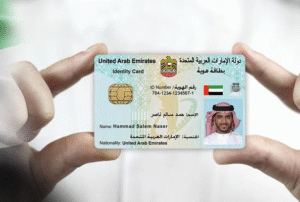
How to Check Emirates ID Status Online
Monitoring how your ID is progressing online is easy, quick, easy, and cost-free. To check your Emirates ID status take these steps:
- Check out the official ID Status page.
- Look for your “Check ID Status” or “Track Application” option.
- Input your identification number, or the application number.
- Click on “Submit” or “Check Status.”
- You can check the status of your card’s most recent progress immediately.
The tracker will display various stages like “Under Processing,” “Card Printed,” or “Ready for Collection.”
If you encounter technical problems or issues with your computer, you may also determine your status by using other methods.
Alternative Ways to Track Your ID Status
If the website is unavailable for any reason There are alternative options to monitor the status of your Emirates ID:
- Mobile App: Download this official application to track your application in real-time.
- Customer Care: Call the customer center and give them the information for your application.
- SMS Alerts Some systems allow you to determine the status of your emirates ID via a simple text message.
Each method offers instant updates, which means you’ll know precisely the status of your credit card.
Common Emirates ID Status Updates You’ll See
Here’s what most commonly used status messages are:
- Request for Application Accepted: Your application has been approved.
- Under Processing: Printing and verification are currently in process.
- Card Printing Your ID has been accepted and printed.
- Card Delivered: It’s in the process of getting to your address.
- Ready to Collect Ready for Collection: Your ID is waiting for collection or delivery.
By monitoring these steps, you’ll be not in the dark regarding the application.
Possible Reasons for Delay
Sometimes, your ID may take longer than you expected. The most common causes are:
- Incorrect or missing documents
- Errors in technical verification
- Late biometric appointments
- Backlogs, holidays, or holidays on the printer’s end
If your status as an emirates ID isn’t updated for a period of two weeks, call Customer Service Center for assistance to resolve the issue quickly.
Top Emirates ID Benefits You Should Know
It’s true that your Emirates Identification Card is more a credit card. It’s the crucial element of convenience. Understanding the benefits of Emirates ID will help you maximize its potential:
- Identification: It is your official ID for all of your needs.
- Healthcare Access Use it in pharmacies and hospitals to verify the coverage of insurance.
- Financial Services: Must be used to establish or maintain accounts with banks.
- Government Services: Essential to establish residency, property and immigration-related processes.
- Travel Convenience: It works at airports with smart gates and counters to facilitate faster processing.
The card you carry around plays an important role in facilitating both your professional and personal life.
How to Replace a Lost or Damaged Emirates ID
It can be nerve-wracking But the process to replace it is simple:
- Report the damaged or lost credit card on the internet or at a branch.
- Include the details of your passport and Visa.
- Make payment for the replacement fee.
- Check the status of your new card with similar ID status services.
The new card will usually be prepared within a few working days
Everything You Should Know About Emirates ID Renewal
The timely renewal of your card guarantees uninterrupted access to all of the services. The process for renewing your Emirates ID is simple and can be completed online.
Here’s how:
- Go to the ID portal, and click “Renew ID.”
- Enter the ID number you have already used.
- Update personal information as necessary.
- Upload your latest photograph (if prompted).
- You can pay the fee for renewal online.
- Track and submit your renewal through this same portal for status.
Renewals prior to the expiry date avoids penalty and helps avoid interruptions in vital services.
Tips to Keep Your Emirates ID Safe and Secure
Because your Emirates ID is tied to all of your financial and personal records, be sure to protect it just as you would your passport.
Here are a few simple, yet highly safe safety tips that are effective:
- Place your card in a safe place.
- Do not divulge your ID number in public.
- Save a digital backup in a secure password-protected file.
- Verify your emirates ID status frequently to ensure that it’s in use.
- Make sure you renew your ID in time to avoid delays or suspension.
What to Do If You Can’t Access the Tracking Page
In the event that your ID tracking site or app doesn’t work Try these easy solutions:
- Refresh or switch to an alternative browser.
- Clear your browser’s history and cookie cache.
- Instead, use the mobile app.
- Try it again in off-peak hours.
- Contact customer support for manual assistance.
Most technical problems are temporary and easy to fix.
Related Article: How to Check Emirates ID Status
Key Takeaways
- Monitoring your Emirates ID’s status will let you know about the status of your card.
- Being able to determine emirates ID status can save time and reduces the need for the need to guess.
- Understanding the benefits of Emirates ID will help you get the most out of the benefits of ID.
- The process of applying for the renewal of your Emirates ID at the right time can avoid unnecessary issues.
- Always keep your ID safe to ensure your identity.
Conclusion
The Emirates ID is more than an identification card -it’s the base of your everyday life. From banking and healthcare to travel and housing, this card can play an important role in keeping everything linked and confirmed.
By monitoring your Emirates ID status, you are updated on your application or renewal process, and ensure that your ID remains in good condition and ready for use. Knowing the procedure and taking prompt actions could save you from time, waiting around for your ID to be renewed, unanticipated charges, and possible interruptions in service.
No matter if you’re submitting your application for your first time or replacing a lost card, or coordinating the renewal of your Emirates ID, being active is crucial. Keep track of your status on a regular basis, adhere to the official rules, and feel the tranquility that comes from staying just one step in front.
Frequently Asked Questions
How long will it take to get the Emirates ID?
Typically it will take between 5 and 10 working days following biometric verification.
How can I verify the status of my passport’s number?
Certain systems permit monitoring of status with your passport number rather than the application number.
What will happen if my application gets delayed?
Give it a few days. If you don’t see any updates then contact the center for service.
Can I renew my membership before when the expiry?
Absolutely. The early renewal can help you avoid interruptions in service.
What should I do if I have lost my Emirates ID?
Make it known immediately and request an exchange using the number on your application.



Leave a Reply